Free Image to Text Converter
Extract editable text from images, screenshots, JPG, PNG, and PDF files instantly using our free online OCR tool. No signup required.
Get Registered — Upload 50 images at once FREE 🎉

Drop, Upload or Paste Images
Supported formats: JPG, PNG, GIF, JFIF (JPEG), HEIC, PDF

Drop, Upload or Paste Images
Supported formats: JPG, PNG, GIF, JFIF (JPEG), HEIC, PDF
 Your privacy is protected. No data is transmitted or stored anywhere.
Your privacy is protected. No data is transmitted or stored anywhere.
Our free Image to Text Converter is an online OCR tool that converts images into editable and searchable text within seconds. Using advanced AI and Optical Character Recognition (OCR) technology, it accurately extracts text from screenshots, scanned documents, photos, and PDFs. This helps you save time, reduce manual typing, and quickly convert images into digital text with high accuracy.
This Image to Text OCR tool lets you:
- Convert images to text with a single click
- Extract text from JPG, PNG, WEBP, and PDF files
- Perform batch image-to-text conversion
- Turn scanned documents into editable text
- Make image text searchable and copyable
- Preserve original document formatting during text extraction

How to Convert Image to Text Using Our Tool?
You can easily convert your images to text using our free online OCR tool with the following simple steps:
Upload your image
Upload one or multiple images to our tool using browse, drag-and-drop, copy-paste, or URL option. You can upload images in the following formats: JPG, PNG, GIF, JFIF (JPEG), HEIC, and PDF.

Start the text extraction process
Once your image has been uploaded, choose Simple OCR for plain text or Formatted OCR to preserve the original formatting. Then, click the Convert button to start the image-to-text conversion process.

Copy or download text
Once the text has been extracted and provided, you can copy or download the converted text. Click the Copy icon to copy text to your clipboard or hit the Download icon to save the text to your device.

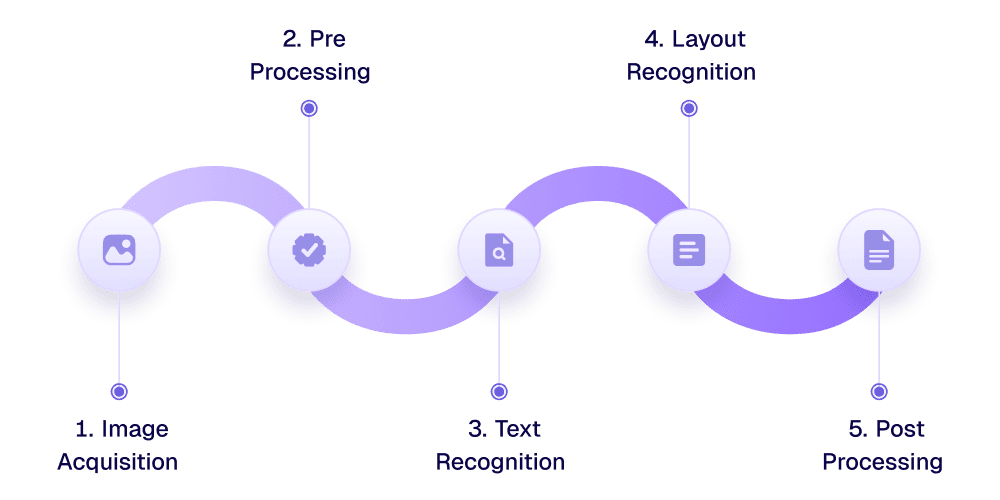
How Does Our Image Text Extractor Work?
Here is a step-by-step guide on how this image to text converter works. This breakdown describes the process in a clear and readable way.
Key Features of This Image to Text Converter
Fast OCR Processing
Our image to text converter tool works very fast. The provided images are scanned, and the text is extracted in a matter of seconds.
AI-Based Text Extraction
Our tool uses advanced OCR and AI technology to recognize the text with high precision. Before finalizing the output, the results are validated against relevant contexts to ensure maximum accuracy.
One-Click Copy Text
This tool makes it very easy to copy the extracted text. All it takes is a single click, and the text will be copied to your clipboard.
Works on All Devices
You can use our image text extractor tool to convert images to text on all devices, be they mobiles, tablets, or laptops. It is supported on all platforms and operating systems, including Android, iOS, Windows, and Linux, etc.
Multi-Language Support
You can upload images containing text in any language. Our tool supports more than 20 languages. As long as the language is Unicode-supported, our tool will function properly.
All Format Support
It doesn’t matter whether your image is in PNG format or JPEG format. Our tool supports all popular image file formats, including JPG, PNG, GIF, JFIF (JPEG), HEIC, and PDF.
Secure Image Processing
We do not store or share your images. All files are securely processed and automatically removed from our servers after a limited retention period.
Support Batch Conversion
This picture to text converter supports batch image conversion. You can enter up to 10 files at the same time and extract text from them at once.
Multiple Upload Options
There are multiple upload options that you can use when fetching files to our tool. Even if the image is not in your device, you can still get it via URL. The options include drag and drop, browse files, copy-paste, and URL.
Use Cases of Our Picture to Text Converter

Low-Resolution Image Text Extraction
Our image to text extractor can help you copy text from low-resolution images. Even if the text is blurred and isn’t very clear, our tool will be able to recognize the characters and extract them accurately.

Detect Mathematical Syntax
Our Image OCR tool is also capable of detecting mathematical syntax in the provided images. For example, if you upload images of your class’s lecture notes with equations and fraction problems, etc., the tool will be able to scan them all and present them in the correct Unicode format.

Improve Research Workflows
You can improve and quicken the pace of your research with our tool by extracting key information from images and physical documents without having to manually copy everything by hand.

Convert Screenshot to Text
With our image text converter, you can convert screenshots to text in seconds. It extracts readable text from screenshots of webpages, apps, videos, or documents, allowing quick copying and editing without retyping.

Handwritten Text Recognition
Our handwriting to text converter can extract handwritten text from images, even when the style varies and is not very clear. You can use it to digitize text from handwritten notes and assignments with ease.

Extract Text from Social Media Images
If you find some valuable content on social media, such as on WhatsApp status or group messages, you can take a screenshot and upload it to our tool. You will be able to grab the text in a matter of seconds and use it however you want.

Digitizing Books
Our tool has a limit of ten files upload at the same time. However, there is no limit on the number of times that you can do this. If you want to digitize an entire book, you can do so by uploading a few images at a time.

Data Analysis
With this image to text generator, you can also conduct data analysis by retrieving data from historical documents, visuals, and editing/manipulating them as per your needs.

Data Entry Automation
Image to Text OCR can help you automate the data entry process. You can pull textual information from visuals and manually add it where you need, without having to type everything from scratch.
Why Choose this Image to Text Converter?
This free online OCR tool is designed to deliver fast, accurate, and hassle-free text extraction from images, screenshots, and scanned documents, all in one simple interface.
🚫
🔐
⚡
🖼️
📄
🌐
Who Can Use This Online Photo to Text Converter?
Students and Teachers
Students and teachers can use this online picture to text converter to extract editable text from photos, handwritten notes, academic textbooks, and worksheets with high accuracy. This tool saves time, improves accessibility, enables easy editing and searching, and supports digital note-taking, assignment creation, and inclusive learning for students with visual or learning disabilities.

Writers and Journalists
Writers and journalists can make use of our JPG to text converter by turning photographed notes, interview recordings, important memos, official documents, and archival materials into editable plain text, which helps them speed up writing, reduce manual transcription, and improve research accuracy.
Retail Workers and Store Managers
Retail workers and store managers use image to text converters to extract editable text from invoices, price tags, inventory lists, and sales reports, reducing paperwork and improving store operations.

Data Analysts and Researchers
Data analysts and researchers can use this picture to text converter to convert charts, scanned documents, handwritten notes, and tables into machine-readable text. This process enables faster data extraction, improves dataset accuracy, supports large-scale analysis, and reduces manual data entry when working with reports, surveys, or archival records.

Business Professionals
Business professionals can use our photo to text converter to convert invoices, contracts, meeting notes, receipts, business reports, and legal documents into editable and searchable text. This automation speeds up documentation, improves record accuracy, enables faster decision-making, and reduces manual data entry across operations, finance, legal, and sales workflows.

Healthcare Workers
This tool helps healthcare workers to convert medical forms, prescriptions, lab reports, and patient charts into digital text. This process improves record accuracy, speeds up documentation, supports compliance, and reduces administrative workload in clinical, billing, and research settings.

Freelancers
Freelancers can use our image to text tool to convert receipts, client briefs, invoices, and contracts into digital form. This automation speeds up administrative tasks, improves record accuracy, simplifies expense tracking, and helps freelancers manage projects, billing, and documentation more efficiently.

Frequently Asked Questions (FAQs)
Below we answer some frequently asked questions.
Yes. The tool is free to use. No signup, subscription, or installation is required to access its features.
Accuracy is high for clear, well-lit images and standard fonts. AI-based processing and post-processing correction help improve results for complex layouts.
Yes. Handwritten text is supported, though accuracy depends on legibility. Clear writing and good image quality produce better output.
Yes. Both scanned documents and screenshots are supported. The tool works well with photos, PDFs, and captured screen content.
Yes. Uploaded images are processed securely and are not stored longer than necessary. Files are removed automatically after processing is complete.
You can convert JPG, PNG, BMP, and TIFF, as well as other popular image file formats. The tool also works with PDF documents and modern image formats used across devices.
No. This tool does not support direct text extraction from YouTube or video files. However, you can extract text from video screenshots or frames by capturing the screen and uploading the image to our AI image to text converter.
Yes, the tool is fully compatible with all mobile phones, tablets, laptops, and desktop computers. It works on all major operating systems and devices, including Windows, macOS, Linux, Android, and iOS (iPhone & iPad).
No, there is no daily limit, so you can convert unlimited images for free.
Our Blogs
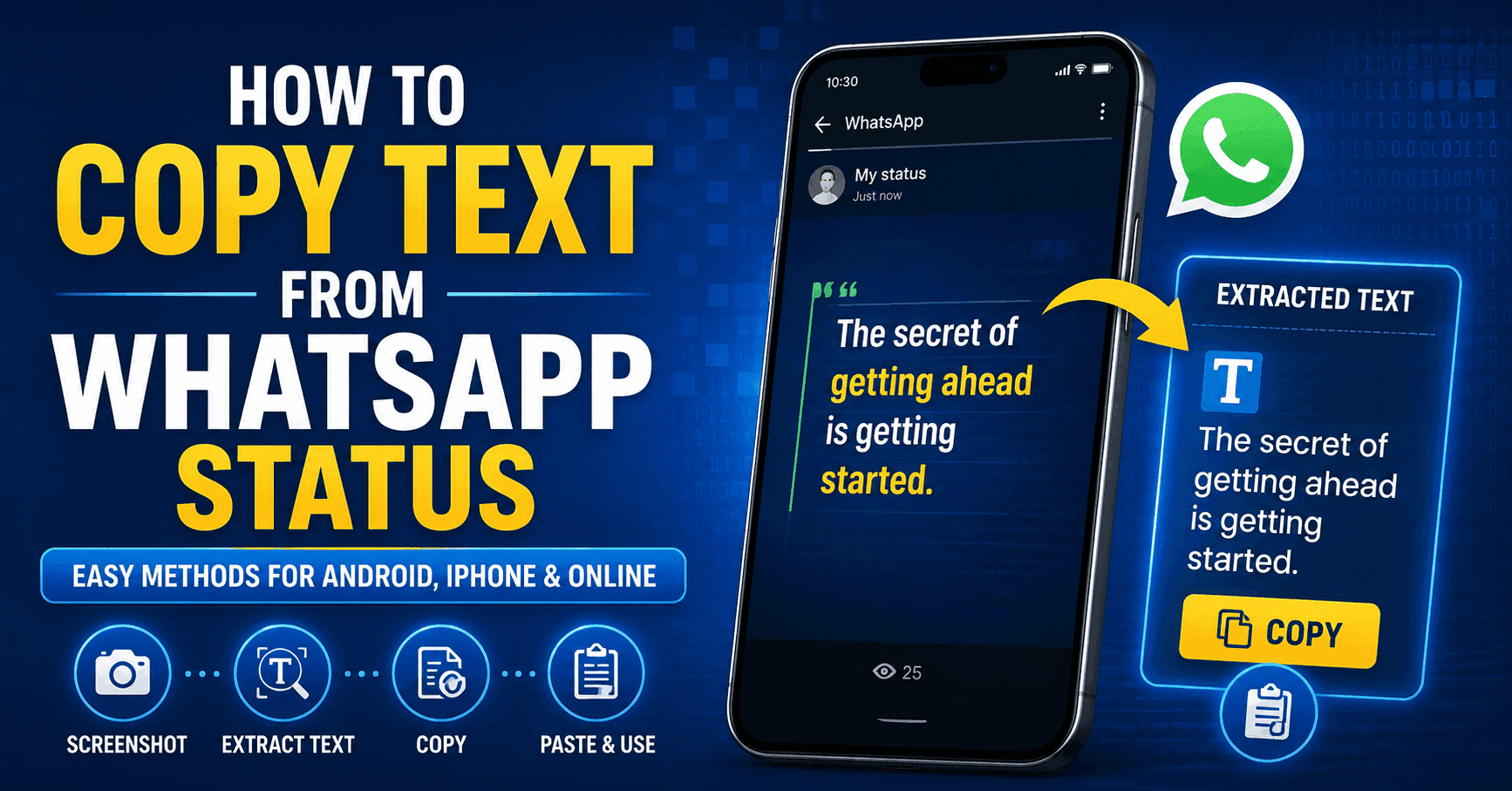
How to Copy Text from WhatsApp Status (Easy Methods)
Learn how to copy text from WhatsApp Status using Google Lens, Live Text, or a free OCR tool. Extract text from screenshots in seconds.
How to Copy Text from an Image on iPhone
Copy text from an image on iPhone with Live Text, Apple Intelligence, or OCR tools. Learn the easiest ways to extract text from photos.
What Is OCR and How Does It Work? A Complete Guide
Learn what OCR (Optical Character Recognition) is and how it works. Discover the OCR process, AI OCR, benefits, use cases, and top OCR tools.
ImageToTextOCR vs ImageToText.info: Which OCR Tool Is Better?
Compare ImageToTextOCR vs ImageToText.info for OCR accuracy, AI features, pricing, speed, and ease of use to find the best OCR tool.
Best Image to Text Converters in 2026 (Ranked & Tested)
Find the best free image to text converter in 2026. We tested 7 top OCR tools for accuracy, speed, and features to help you pick the right one in seconds.
How to Extract Text from an Image (Step-by-Step Guide)
Learn a complete step-by-step guide to extract text from an image for free using online OCR tools, mobile apps, Windows Snipping tool, or Google Docs.
How to Convert Image to Text Online (Step-by-step Guide)
Learn how to convert an image to text online with this step-by-step guide. Follow simple methods to extract editable text from images easily.